
Entrepreneurs usually struggle to build business systems because recurring work still depends on knowledge, judgment and decisions that live inside particular people’s heads. Writing down the obvious steps can help, but it does not create a reliable system when nobody owns the outcome, employees still need permission for routine decisions, handoffs are unclear, or unusual cases immediately return to the founder.
A functioning business system makes recurring work repeatable, transferable and observable. Someone should be able to tell what starts the work, what successful completion looks like, who owns the result, which decisions can be made without escalation, what happens when the normal path fails, and how the company knows whether the process is still working. If those elements remain informal, the business may have documentation without having a dependable operating system.
The Quick Diagnosis: Why Business Systems Break
If your processes exist but the business still feels dependent on you, check these failure points first:
- The result is unclear: Employees know the steps but do not know what “done correctly” means.
- Ownership is vague: Several people touch the work, but nobody owns the final result.
- Decision authority is missing: Routine exceptions repeatedly require founder approval.
- The documented process differs from reality: Employees have developed workarounds because the official version no longer fits the job.
- Handoffs lose context: Information or responsibility disappears when work moves between people or departments.
- Exceptions have no route: The normal process works, while anything unusual sits in an inbox or becomes a management problem.
- Nobody measures the outcome: The company cannot tell whether the process improved speed, accuracy, quality or customer experience.
- The system is never reviewed: People, software and customer requirements change while the documented process remains frozen.
- Automation comes too early: Technology starts executing rules before the business has decided whether those rules are actually correct.
The first action is therefore not to document everything. Choose one recurring process that creates interruptions, errors, customer frustration, rework or founder involvement, and determine exactly where its operating logic breaks.
Business System vs Process vs SOP vs Checklist vs Automation
Owners often use these terms interchangeably, which creates expensive confusion. An SOP can be part of a system, and automation can execute part of a process, but neither automatically solves ownership, judgment, exceptions or measurement.
| Operating Element | Primary Job | What It Does Not Solve Alone |
|---|---|---|
| Business system | Connects people, information, rules and actions to produce a recurring result. | Still needs monitoring, ownership and improvement. |
| Process | Shows how work moves from a trigger toward an outcome. | May leave authority, exceptions and accountability undefined. |
| SOP | Documents the agreed method for performing recurring work. | Cannot anticipate every decision or unusual case. |
| Checklist | Prevents important checks or actions from being forgotten. | Does not explain the complete operating logic. |
| Automation | Executes or coordinates defined actions automatically. | Cannot repair unclear rules, ownership or exception handling. |
The distinction matters because owners frequently reach for the wrong solution. If nobody knows who approves an unusual refund, writing a longer checklist will not establish authority. If three employees interpret the same customer request differently, automating the handoff may simply make those inconsistencies move faster.
A Business System Is More Than Written Instructions
A reliable business system connects interrelated activities so that the intended result can be produced consistently and improved when problems appear. The ISO explanation of the process approach similarly emphasizes identifying key processes, defining responsibilities, controlling variation, using performance data and improving systems based on evidence. A small business does not need formal certification to benefit from the same operating principle: recurring work becomes easier to manage when responsibilities, process interactions and outcomes are explicit.
Consider customer onboarding. A simple SOP might explain how to create an account, send a welcome message and schedule the first meeting, but the real business system must answer additional questions. What starts onboarding, who owns completion, what information must be received, who can proceed when something is missing, what happens when the customer delays, and what confirms that onboarding is genuinely complete?
Those questions reveal why a document can be perfectly written and still fail operationally. The steps describe the normal path, while the surrounding system determines whether real work can continue when the normal path becomes messy.
The Business System Reliability Chain
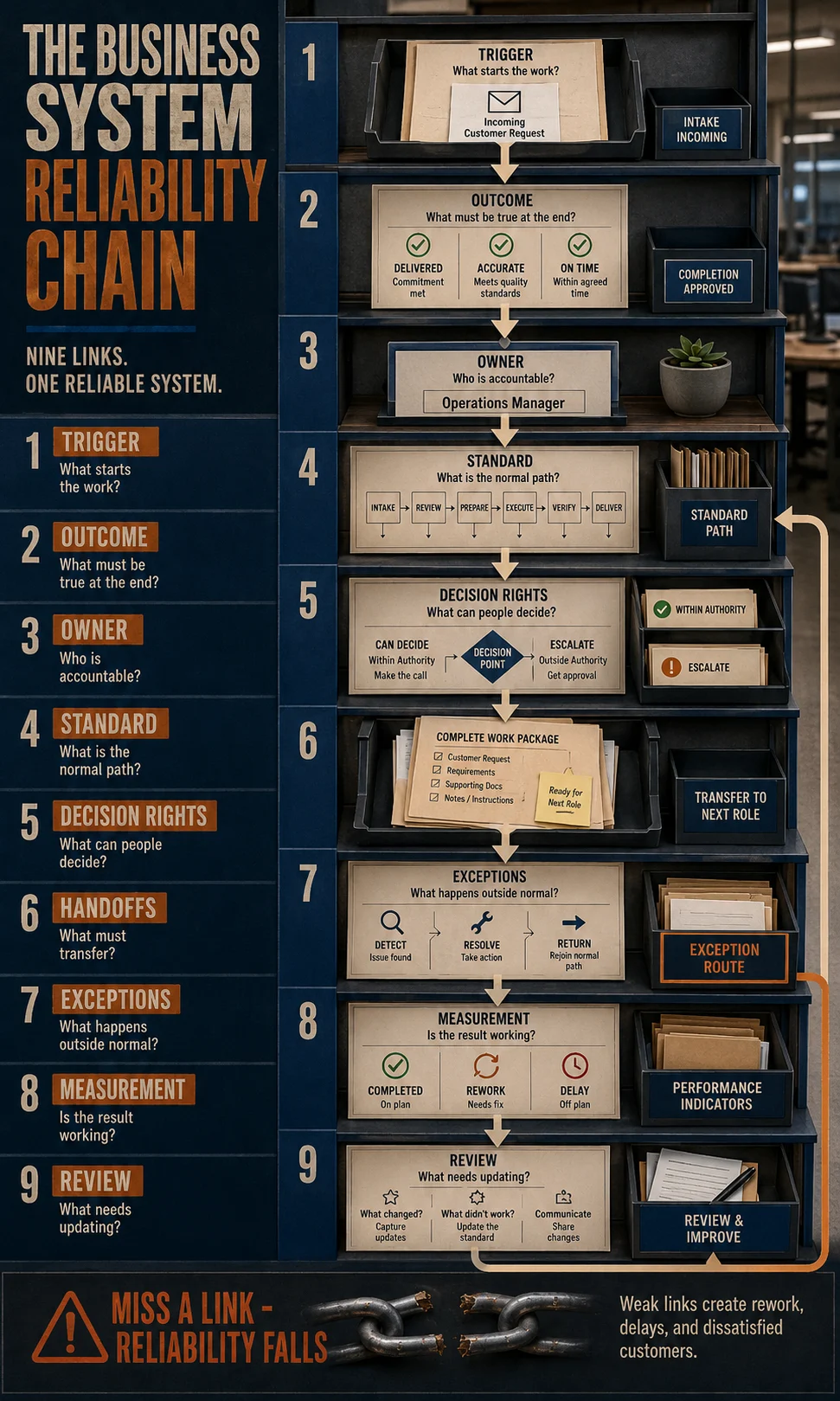
A recurring activity becomes easier to delegate and maintain when nine operating elements are clear:
Trigger → Outcome → Owner → Standard → Decision Rights → Handoffs → Exceptions → Measurement → Review
Each element solves a different failure point. Missing one does not always cause an immediate breakdown, but the gap becomes more visible as the company adds employees, customers, services or software.
1. Trigger – What Starts the Process?
A process needs an observable starting condition rather than a vague instruction such as “handle new customers.” The trigger might be a signed agreement, confirmed payment, submitted request, low-stock alert or approved purchase. When people disagree about when work officially begins, they also disagree about deadlines, responsibility and whether something is late.
The trigger should also identify the minimum information required to begin. If a project cannot start without the customer’s measurements, approval or payment, that requirement belongs at the entrance to the system rather than becoming a surprise halfway through delivery.
2. Outcome – What Does Successful Completion Actually Mean?
A task can be completed while the business result remains unfinished. An employee may tick every onboarding step, for example, while the customer still lacks access to a required service or has no confirmed first delivery date. A system therefore needs a clear definition of the accepted outcome.
This is one of the simplest ways to improve weak SOPs. Instead of documenting only what employees should do, define what must be true when the process finishes. That gives employees a way to recognize incomplete work even when the exact situation differs from the example in the document.
3. Owner – Who Is Accountable for the Final Result?
Several people can work inside one process, but accountability should not disappear between them. A process owner is the person responsible for ensuring that the process achieves its intended result, even when individual activities are delegated to others.
The distinction becomes especially important as a company grows. Clear small business roles and responsibilities reduce confusion about who performs work, while process ownership answers a different question: who is accountable for whether this recurring operating result actually happens?
Why the Founder Becomes the Hidden Operating System
Many small businesses appear systemized until something unusual happens. The team can complete normal transactions, follow checklists and use the software, but the founder still knows which customers deserve an exception, when a deadline can move, which supplier requires extra follow-up and which quality problem needs escalation. Those unwritten decisions make the founder the real operating system behind the documented one.
This explains why delegation can feel unsuccessful even after responsibilities are assigned. The employee receives the task but not the boundaries of authority, so ordinary decisions continue to return to the owner. As volume rises, those small questions accumulate into a queue that limits how much work the organization can process.
That relationship also connects directly to business scalability. A company can add employees and software while remaining difficult to scale if recurring decisions still require the same founder to interpret every exception.
Find the Questions That Keep Coming Back
Do not begin by asking what else should be documented. Look at the questions employees repeatedly bring to the same person because recurring questions expose missing operating logic much faster.

Typical examples include:
- “Can I approve this?”
- “Which customer gets priority?”
- “What do I do if this information is missing?”
- “Who takes over after I finish?”
- “Is this exception allowed?”
- “Which version should I use?”
- “When should I escalate this?”
- “Who tells the customer?”
- “How do I know this is finished?”
Each repeated question should be classified. It may reveal a missing decision rule, unclear ownership, incomplete input requirement, weak handoff, undefined exception route or missing completion criterion.
That is far more useful than simply producing another procedure document.
Documented Does Not Mean Systemized
A document records information. A system organizes how work actually operates.
That difference is easy to miss because documentation creates visible evidence of progress. An owner can point to a folder containing 40 SOPs, while employees still use personal spreadsheets, send important information through messages, ask managers for routine approvals and invent workarounds whenever the official process becomes inconvenient.
Recent demand around SOP adoption reflects exactly this problem: current guidance repeatedly identifies procedures that no longer match real work, documents that are hard to use, unclear accountability and processes that are never updated.
The stronger operating question is:
Could a capable person who did not create this process run the normal case, recognize an exception and know who owns the next decision?
If the answer is no, the business still has hidden operating knowledge to extract.
Why SOPs Drift Away From Real Work
A process can be correct when it is documented and still become unreliable months later because the business around it changes. New software is introduced, customer expectations shift, responsibilities move between employees, pricing rules change, workarounds become common, or a once-rare exception becomes routine. The document stays frozen while the actual operating behavior evolves, creating a gap between the official system and the way work is really being done.
That gap can be thought of as system drift. It usually develops gradually, which makes it harder to notice than an obvious process failure. Employees may continue completing the work successfully by relying on personal knowledge, shortcuts or informal communication, so management does not realize that the documented version has stopped describing reality.
Signs That System Drift Is Already Happening
Look for patterns that indicate the formal process and the real process have separated:
- Employees routinely skip or reorder documented steps.
- New staff learn important parts of the process verbally rather than from the official documentation.
- Personal spreadsheets or messaging threads contain information the main system does not capture.
- Different employees use different versions of the same document or template.
- Managers frequently make exceptions that are never added to the procedure.
- A process refers to software, roles or approval rules that no longer exist.
- Completion times have increased even though the written workflow has not changed.
- Employees say, “We do not actually do it that way anymore.”
- A procedure works only because one experienced employee knows how to compensate for its weaknesses.
The problem is rarely solved by telling employees to follow the SOP more strictly. If the real workflow has changed for legitimate reasons, the system itself needs to be reviewed. If the workaround exists because employees are avoiding necessary controls, the business needs to understand why the control is failing before deciding whether to redesign or reinforce it.
Ownership Problems Make Good Processes Look Broken
A process can contain perfectly reasonable steps and still fail because responsibility becomes unclear once several people participate. Work moves from sales to operations, operations sends something to finance, finance waits for information from the client, and everyone assumes somebody else is responsible for moving the job forward.
This is where task ownership and process ownership need to be separated. An employee may own one activity inside a workflow, while a process owner remains accountable for whether the overall outcome is achieved. Without that distinction, a business can assign every individual task and still have nobody watching the result from beginning to end.
One Process Should Have One Accountable Owner
The accountable owner does not need to perform every step. Their job is to make sure the process has a clear outcome, the handoffs work, unresolved exceptions are escalated, performance is monitored and the system is reviewed when recurring failures appear.
A practical ownership test is to ask:
If this process fails tomorrow, who is expected to notice, investigate and improve it?
If the answer is a department, a group or “whoever sees the problem first,” ownership is probably too vague.
Clear business roles and responsibilities can establish who performs recurring work, while process ownership determines who is responsible for the reliability of the workflow itself. The two structures should reinforce each other rather than creating parallel chains of responsibility.
Handoffs Are Where Reliable Work Often Becomes Unreliable
Most process documentation focuses heavily on what happens inside a role and much less on what happens between roles. Yet handoffs are often where delays, duplicated work and missing information appear because the person sending the work and the person receiving it may have different assumptions about what “ready” means.
Consider a sales-to-operations handoff. Sales may believe the job is ready as soon as the contract is signed, while operations may require confirmed scope, customer contacts, technical information and payment status before work can begin. If those acceptance conditions are not explicit, operations either waits for missing information or starts with incomplete inputs and absorbs the consequences later.
Define a Handoff Like a Small Contract
Every important handoff should answer four practical questions:
- What is being transferred? The specific work item, information or responsibility.
- What must be complete first? The minimum conditions before the receiving person accepts it.
- Who owns the next action? Responsibility should change visibly rather than remain ambiguous.
- What happens if the handoff is incomplete? The receiver needs a defined return or escalation route.
This reduces the common situation where one employee says, “I sent it,” while another says, “I could not start because it was incomplete.”
The Exception Path Is What Separates a Procedure From a Usable System
Normal cases are easy to document. Real businesses become difficult when the normal assumptions stop being true.
A customer provides incomplete information. A supplier cannot deliver. A payment fails. A project deadline needs to move. A refund exceeds the normal amount. An employee discovers that the requested work falls outside the contracted scope. These situations are not necessarily process failures because exceptions are a normal part of operations.
The system fails when nobody knows what to do with the exception.
Build an Exception Path Before You Need It
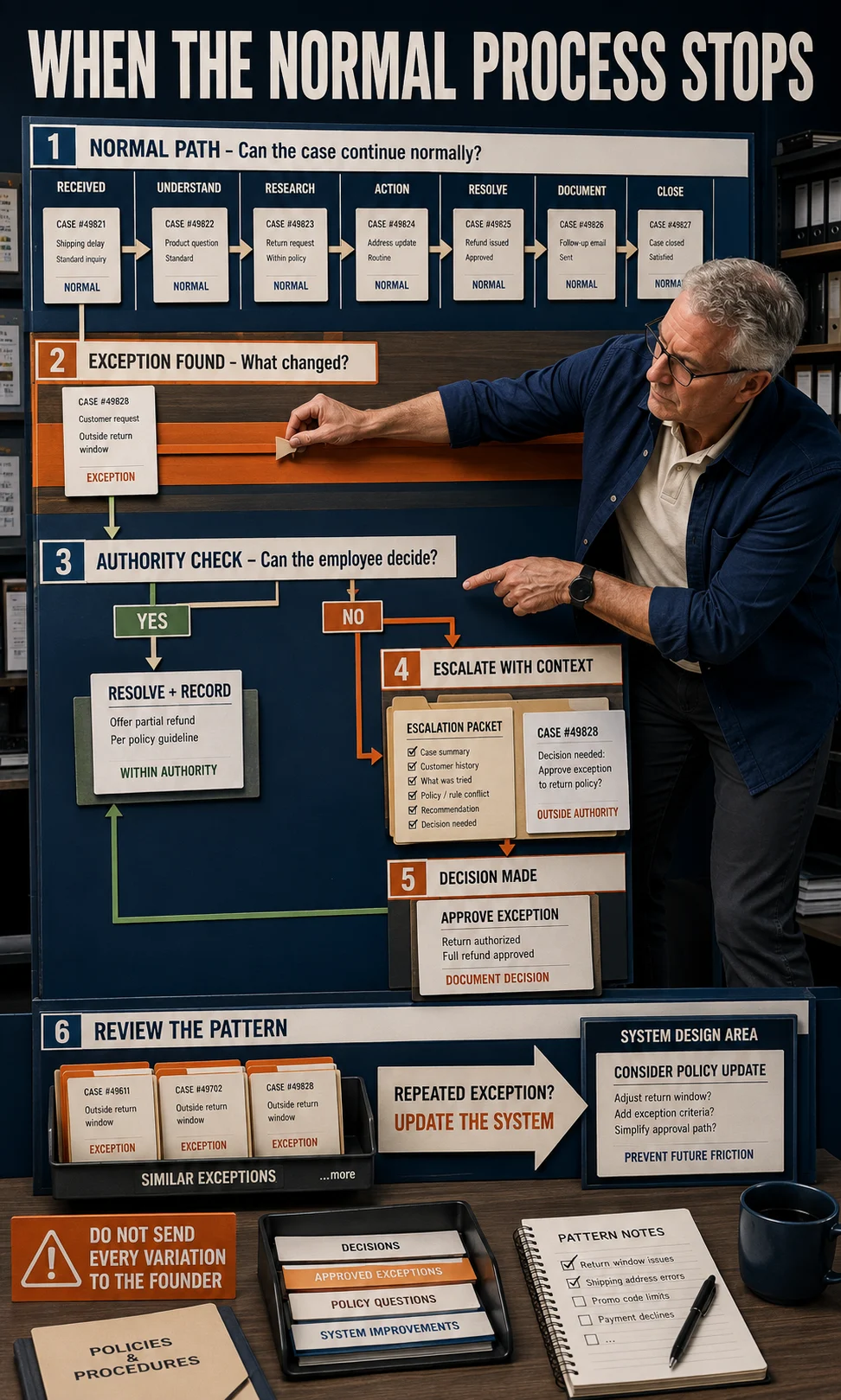
A useful exception path should define:
- What qualifies as an exception. Employees need to know when the standard route no longer applies.
- What they can decide themselves. Routine variation should not automatically become management work.
- What requires escalation. Financial, contractual, safety or customer-impact thresholds may justify senior review.
- Who receives the escalation. The employee should not need to search for the right person.
- What information must accompany it. Escalations are much faster when the decision-maker receives the relevant facts immediately.
- What happens afterward. Repeated exceptions should become input for system improvement rather than remaining isolated incidents.
The objective is not to predict every unusual event. It is to create a controlled route for situations the standard workflow cannot resolve.
Decision Rights Reduce Founder Dependence Faster Than Longer SOPs
Entrepreneurs often try to delegate by handing over more tasks while keeping most decisions. That creates the appearance of delegation without creating much additional organizational capacity.
Imagine a customer-service employee who can answer inquiries but must ask the owner before issuing any refund, changing a delivery date, replacing a damaged item or offering a goodwill concession. The employee owns the conversation, but the founder still owns the decisions that determine whether the conversation can finish.
A stronger system defines decision boundaries such as:
- which situations employees may resolve independently
- which amounts or commitments require approval
- which customer conditions qualify for an exception
- which issues require legal, financial or technical review
- what evidence employees should record when exercising discretion
These rules should be specific enough to create confidence without trying to anticipate every possible circumstance.
Do Not Convert Every Judgment Into a Rule
Some decisions genuinely require experience, negotiation or professional judgment. Forcing complex judgment into rigid rules can create poor outcomes because employees begin following the rule even when the context clearly requires escalation.
The goal is to distinguish between repeatable judgment and specialist judgment. Repeatable judgment can often be supported by thresholds, examples and decision criteria. Specialist judgment should remain with the person who has the expertise and authority to make the call.
When Automation Makes a Bad Process Worse
Automation is useful once the business has a reasonably stable process, clear inputs, defined rules and predictable outcomes. If those foundations are weak, software can scale the inconsistency instead of removing it.
For example, automating customer onboarding may save significant time when the required information, account setup sequence and exception rules are already understood. If sales teams collect different information for every customer and nobody agrees on what counts as a complete handoff, the automation will repeatedly encounter missing inputs and create more manual correction.
The U.S. Small Business Administration’s guidance on AI for small businesses highlights repeat tasks, data analysis and reusable templates as practical areas where technology can support business operations. Those uses are strongest when the underlying work is sufficiently consistent for the technology to follow a dependable pattern.
Use the Automation Readiness Check
A recurring process is a stronger automation candidate when most of these statements are true:
- The trigger is clear.
- Required inputs are predictable.
- The normal workflow is stable.
- One owner is accountable for the outcome.
- Decision rules are understood.
- Exceptions are identifiable.
- The current process already produces reasonably consistent results.
- The expected output can be checked.
- Employees are not constantly inventing workarounds.
If several of those conditions are missing, improve the process before investing heavily in automation.
How to Build One Reliable Business System
Do not begin by trying to systemize the entire company. Choose one recurring activity with enough operational consequence to justify the effort, then build and test the complete system before moving to the next process.
The best first candidate usually has at least one of these characteristics: it interrupts the founder frequently, creates customer complaints, produces repeated rework, causes delays, depends heavily on one person’s memory or occurs often enough that small inefficiencies accumulate into meaningful cost.
Step 1: Choose a Recurring Problem, Not a Department
“Systemize operations” is too broad to act on. Select a specific recurring result such as onboarding a new client, approving an expense, fulfilling an order, scheduling a project, responding to a complaint or replenishing inventory.
The process boundary should be clear enough that you can identify its beginning and end. That makes it possible to observe performance rather than discussing systemization as a general management goal.
Step 2: Define the Trigger and the Finished Outcome
Write one sentence for each.
Trigger example: A signed customer agreement and required initial payment are received.
Outcome example: The customer account is configured, required information is verified, responsibilities are confirmed and the first delivery milestone is scheduled.
These two statements create a boundary around the process. Everything between them should contribute to producing the defined outcome.
Step 3: Assign One Accountable Owner
Choose the person responsible for the reliability of the entire process. They can delegate individual activities, but somebody must have enough visibility to know whether work has stalled, whether exceptions are increasing and whether the expected outcome is being produced consistently.
This is especially useful in growing businesses where several departments contribute to the same customer result. Without an accountable owner, the business often improves individual tasks while the end-to-end experience remains unreliable.
Step 4: Observe the Real Process Before Documenting It
Do not write the SOP from memory.
Watch the work happen.
Capture:
- which information is actually used
- which decisions occur
- where employees wait
- where work moves between people
- which shortcuts are common
- which exceptions repeat
- where employees ask questions
- which steps create rework
- what information gets duplicated
This observation usually reveals a different workflow from the one management believes exists.
Step 5: Remove Unnecessary Work Before Standardizing the Rest
Documentation should not preserve waste simply because the waste is familiar.
Ask whether each step exists because it creates value, manages a real risk, satisfies a necessary control or enables another part of the process. Duplicate approvals, repeated data entry, unnecessary status meetings and outdated checks can sometimes be removed before the process is documented.
This is where business systems connect to business planning at an operational level. The company should be able to connect recurring activities to the outcomes, resources and risks they are meant to manage rather than keeping steps simply because “we have always done it this way.”
Step 6: Document the Normal Path
Once unnecessary work is removed, document the standard route clearly enough that a capable person can follow it without needing the process creator beside them.
Include:
- starting condition
- required inputs
- sequence
- responsible role
- important decision points
- expected outputs
- completion condition
The document should remain concise enough to be used during real work. A 40-page procedure that nobody can consult quickly may contain more information while functioning worse as an operating aid.
Step 7: Add Decision Rights and the Exception Path
Now document where employees have discretion and where escalation begins.
For each major decision, ask:
Can the process owner or operator decide this independently?
If yes, define the relevant boundary or criteria.
If no, define who approves it, what information they need and what happens while the decision is pending.
This is the layer that converts a simple sequence into something employees can use under real operating conditions.
Step 8: Define the Handoffs
Mark every point where responsibility or information moves from one person, role or system to another.
For each handoff, define:
sender → required package → acceptance condition → receiver → next action
If you cannot describe the transfer clearly, the process is vulnerable to waiting, duplication or lost context.
Step 9: Choose a Small Number of Useful Measures
Do not measure everything simply because software makes data available.
Choose measures that tell you whether the process is achieving its intended outcome. Depending on the workflow, useful measures might include:
- completion time
- error rate
- rework
- number of escalations
- missed handoffs
- overdue tasks
- customer complaints
- first-pass completion
- exception frequency
A process that becomes faster while error rates rise may not actually be improving. Measurement should reflect the result the system exists to produce.
Step 10: Test the System With Someone Who Did Not Build It
This is one of the fastest ways to expose hidden assumptions.
Ask a capable employee who was not involved in writing the procedure to run the process using the system as documented. Watch where they hesitate, ask questions, infer missing information or choose a path you did not expect.
Every question reveals potential hidden knowledge.
The objective is not to make the employee pass the test. The objective is to make the system pass the employee.
Step 11: Review the Exceptions Before Expanding the System
After the new process has been used for a reasonable operating cycle, examine what happened outside the normal path.
Ask:
- Which exceptions repeated?
- Which escalations were unnecessary?
- Which decisions still returned to the founder?
- Which handoffs created delays?
- Which instructions were ignored?
- Which measurements deteriorated?
- Which workarounds appeared?
Repeated exceptions often deserve promotion into the official system. A rare unusual case may remain an escalation, while a situation occurring every week should probably become part of the normal operating logic.
Step 12: Automate Only the Stable Parts
Once the process has clear triggers, inputs, rules and outcomes, automation can remove repetitive execution or information movement. Automate the parts that are sufficiently predictable, then monitor whether automation changes exception rates or creates new failure points.
The strongest business system is therefore rarely “fully automated.” It usually combines automated execution for predictable work with human judgment where context genuinely matters.
A Practical Business System Build Sequence
| Stage | Main Question | Failure Sign | Next Action |
|---|---|---|---|
| 1. Define | What starts the work, and what result ends it? | Employees disagree about when the process begins or is complete. | Clarify trigger, inputs and outcome. |
| 2. Own | Who is accountable for the final result? | Problems move between people without resolution. | Assign one process owner. |
| 3. Simplify | Which steps genuinely need to exist? | Employees duplicate work or bypass unnecessary controls. | Remove waste before documenting. |
| 4. Standardize | Can a capable employee follow the normal path? | People perform the same recurring work differently. | Document the standard workflow. |
| 5. Empower | Which decisions can employees make? | Routine work repeatedly waits for approval. | Define decision rights and escalation conditions. |
| 6. Protect | What happens when the normal path fails? | Exceptions become improvised management problems. | Create an exception route. |
| 7. Measure | How will we know whether the system works? | Nobody can tell whether speed, quality or consistency improved. | Track a few outcome-linked measures. |
| 8. Improve | What changed after real-world use? | Workarounds and repeated exceptions appear. | Review and update the system. |
| 9. Automate | Which stable actions no longer require manual execution? | Automation creates frequent manual corrections. | Automate only predictable parts. |
Do Not Try to Systemize Everything at Once
The strongest first system is usually the one causing the most operational friction, rather than the process that is easiest to document. If the founder receives ten questions every day about project approvals while the office-supply ordering process works fine, project approvals deserve attention first.
A practical priority order is:
- High-frequency recurring work that consumes substantial employee or founder time.
- Customer-facing work where inconsistency affects service quality or trust.
- Processes with expensive mistakes such as billing, purchasing or contractual commitments.
- Founder-dependent work that blocks delegation or growth.
- Processes with repeated handoff failures between teams or roles.
- Work that is likely to be automated, because standardization should usually come first.
This approach also helps prevent a systemization project from becoming another administrative burden. Improving one meaningful operating problem creates evidence about what works before the company invests time documenting dozens of lower-impact activities.
How to Know Whether the New System Is Actually Working
A business system is working when the result becomes more predictable without requiring constant management rescue.
Look for practical changes:
- Employees ask fewer recurring questions.
- The same work produces more consistent outcomes.
- Handoffs contain the information the next person needs.
- Routine decisions no longer wait for the founder.
- Exceptions follow a defined route.
- New employees become productive faster.
- Rework and correction decline.
- Customers receive a more predictable experience.
- The process can be reviewed using actual performance evidence.
Do not expect every metric to improve at once. A more controlled process may initially take slightly longer while employees learn it, yet still create value by reducing errors or founder intervention. The relevant question is whether the process is moving toward the outcome the business actually needs.
When a Business System Becomes a Scaling Advantage
Systems matter most when the company needs more people, more customers or more volume to move through the same operating architecture. Without repeatable processes, growth creates more decisions, exceptions and coordination work for the founder and management team.
A reliable system gives the organization leverage because knowledge becomes transferable. New employees do not need to rediscover every rule, managers can focus on unusual decisions rather than routine approvals, and technology can support stable workflows instead of trying to compensate for ambiguity.
That does not mean every business should aim for identical or rigid operations. Service companies in particular may need substantial customization depending on the business model used to deliver services. The system should standardize the parts that benefit from consistency while preserving professional judgment where customer circumstances genuinely require it.
Why Business Systems Quietly Decay After They Are Built
A business system rarely stops working all at once. More often, it loses reliability gradually as employees change, software is replaced, customer expectations shift, approval rules evolve, or new products introduce conditions the original workflow never anticipated. The formal process remains visible, so management assumes the system still exists, while the real work has already moved somewhere else.
This gap between the documented process and current operating behavior is system drift. It matters because a drifting system can appear healthy for months when experienced employees are compensating for its weaknesses through memory and workarounds. The problem often becomes visible only when someone leaves, volume rises, a new employee follows the written instructions literally, or automation exposes inconsistencies that humans had been quietly correcting.
Four Types of System Drift to Watch
Process drift occurs when employees change the order or method of work because the original procedure no longer fits reality. Some changes may be sensible improvements, while others remove necessary controls.
Decision drift occurs when approvals and exceptions are handled differently depending on who is working. A refund that one manager routinely approves may still be escalated by another because the decision boundary was never updated.
Ownership drift appears when responsibilities move informally after hiring, restructuring or employee turnover. The workflow continues, but nobody is certain who now owns the final result.
Technology drift develops when software, templates, integrations or file locations change without the operating documentation changing with them. Employees then rely increasingly on verbal instructions and local workarounds.
These problems deserve different responses. Updating a screenshot will not repair unclear ownership, and retraining employees on an outdated workflow will not solve process drift.
Use Exceptions as Maintenance Data
Exceptions are often treated as interruptions that should be resolved quickly and forgotten. They can also be some of the most valuable information a business system produces because repeated exceptions show where the normal operating model no longer represents reality.
Suppose a purchasing process requires owner approval for all rush orders. If rush orders occurred twice last year, escalation may have been appropriate. If they now occur several times every week, the business should investigate whether the situation still qualifies as an exception, whether a lower-level employee can receive defined authority, or whether the planning process upstream has become unreliable.
The same reasoning applies to customer requests, delivery delays, payment problems, scope changes and quality issues. The question is not simply whether an exception occurred. The more useful question is whether the same type of exception is becoming predictable.
When an Exception Should Become Part of the Standard
Consider updating the system when an exception:
- occurs repeatedly rather than occasionally
- follows a recognizable pattern
- can be resolved using consistent decision criteria
- consumes significant management time
- regularly causes delays or customer frustration
- creates different answers depending on who receives it
- exposes a missing input, handoff or authority rule
A rare event can remain an escalation. A recurring event should eventually become operating knowledge.
The System Review Should Ask Whether Reality Has Changed
A review is more useful when it examines the real workflow rather than merely checking whether the document has a recent date on it. Speak with the employees who actually perform the work, review recurring exceptions, inspect workarounds and compare the current workflow with the written one.
Ask:
- Which documented steps are no longer performed?
- Which undocumented steps have become necessary?
- Which decisions still cause uncertainty?
- Where does work regularly wait?
- Which information is repeatedly missing?
- Which handoffs create questions?
- What has changed in customer expectations?
- Which technology or responsibility changes are absent from the documentation?
- Which exceptions have become common enough to standardize?
This creates a maintenance loop in which operating evidence changes the system instead of allowing the system to become a historical record of how the company once worked.
Common Business System Mistakes
Mistake 1: Documenting Everything Before Prioritizing Anything
A company may spend weeks creating procedures for dozens of activities while the process causing the most customer complaints or founder interruptions remains untouched. Documentation volume is a poor measure of system maturity.
Prioritize according to operational consequence. A workflow deserves earlier attention when failure creates costly errors, delays revenue, affects customers, blocks delegation or repeatedly consumes senior attention.
Mistake 2: Writing the Ideal Process Instead of Observing the Real One
Managers frequently document how they believe work should happen. Employees then receive a polished procedure that ignores the shortcuts, dependencies and decision points they encounter every day.
Observe the workflow first. A realistic process can then be improved deliberately, while an imagined process usually creates immediate divergence between the document and actual work.
Mistake 3: Confusing More Detail With More Control
A longer SOP can sometimes improve precision, but length alone does not produce reliability. Excessive documentation may make important rules harder to locate while employees create their own condensed versions for daily use.
Put detail where mistakes have meaningful consequences. Use concise steps, checklists and decision criteria for routine execution, while keeping deeper explanation available where professional judgment or complex troubleshooting requires it.
Mistake 4: Assigning Tasks Without Assigning Decision Authority
Delegation fails quickly when employees can perform an activity but cannot make the decisions necessary to complete it. Work appears distributed across the team while approvals continue accumulating with the founder.
Pair responsibility with appropriate authority. Define what employees can decide, what boundaries apply and which conditions require escalation.
Mistake 5: Treating Every Exception as a Management Problem
If every unusual case travels upward, managers become permanent exception handlers. The organization learns very little because repeated situations never become part of the operating system.
Track recurring exceptions and convert predictable ones into rules, decision criteria or revised process paths.
Mistake 6: Automating Before Understanding the Failure
Software can make a stable process more efficient, but it can also hide poor design behind additional technical complexity. When automation fails repeatedly, people may spend more time correcting the system than the original manual process required.
Stabilize the workflow first. Automation should remove predictable execution, rather than become a substitute for process thinking.
Mistake 7: Creating a System With No Measurement
If a company cannot tell whether a new process reduced errors, shortened completion time or decreased founder involvement, it cannot know whether the system actually improved.
Choose a small set of measures linked directly to the purpose of the process. Measurement should help management decide whether to keep, modify or investigate the system further.
Mistake 8: Never Assigning Responsibility for System Maintenance
A procedure without a maintenance owner eventually becomes historical documentation. Someone needs responsibility for reviewing repeated failures, updating operating rules and confirming that the documented process still reflects reality.
That responsibility does not require constant editing. It requires a clear answer to the question: who notices when this system stops matching the business?
The 30-Day Business System Audit
A full operational transformation is unnecessary for many small businesses. A focused 30-day audit can expose one high-value process, remove its most important hidden dependencies and produce a working model that can later be applied elsewhere.
Days 1-5: Find the Recurring Friction
Track interruptions, recurring questions, rework, complaints, waiting time and owner approvals for several working days. Avoid relying only on memory because the most irritating problem is not always the most frequent or expensive one.
At the end of the period, choose one process where improving reliability would create a meaningful operational benefit.
Days 6-10: Observe the Real Workflow
Follow several real cases from trigger to completion. Record the people involved, systems used, information required, decision points, waiting periods, workarounds and exceptions.
Do not redesign yet. The objective is to understand what currently happens.
Days 11-15: Define the Operating Logic
Clarify:
- trigger
- required inputs
- desired outcome
- accountable owner
- standard sequence
- decision rights
- handoffs
- exception route
At this stage, many apparent documentation problems reveal themselves as ownership or decision problems.
Days 16-20: Simplify and Document
Remove steps that add no useful value or control, then document the remaining normal path in a format employees can use during real work. Use checklists for verification, concise procedures for routine execution and supporting detail only where complexity requires it.
The objective is usable operating guidance rather than an impressive manual.
Days 21-25: Test With Real Employees
Ask someone who did not create the system to use it on normal work. Observe every hesitation, question, workaround and unexpected decision because each one reveals a possible gap.
Revise the system where the problem is genuinely structural. Avoid rewriting simply because a new employee needs reasonable training.
Days 26-30: Measure and Review the Exceptions
Compare the new process with the original problem. Did founder questions decline? Are handoffs cleaner? Are errors or rework lower? Are customers receiving a more predictable experience?
Then review the exceptions generated during the test. Decide which ones deserve new operating rules and which should remain legitimate escalations.
What Should You Systemize First?
The first process should usually be one where greater reliability creates immediate leverage. That may be customer onboarding, quoting, purchasing, invoicing, order fulfillment, project kickoff, quality review or complaint handling.
A useful prioritization test is to assess four dimensions:
Frequency: How often does the process occur?
Consequence: What happens when it fails?
Dependency: How heavily does it rely on one person’s memory or authority?
Repeatability: Is enough of the work similar each time that a system could realistically help?
A process scoring highly across several of these dimensions is usually a stronger candidate than an activity that happens rarely or requires highly individualized professional judgment.
Start With the Process That Keeps Interrupting You
Founder interruptions are especially useful diagnostic evidence because they show where organizational knowledge has failed to transfer. If employees ask the same types of questions every week, those questions can often be converted into better inputs, clearer ownership, stronger decision rules or a defined exception route.
Do not aim to eliminate all questions. Good employees should escalate genuinely unusual, risky or high-consequence situations. The goal is to stop routine uncertainty from consuming the same senior judgment repeatedly.
How Business Systems Support Better Delegation
Delegation becomes more reliable when the employee receives four things together: a clear outcome, enough context to understand the work, appropriate decision authority and a defined escalation path. Giving someone only the task leaves them dependent on the person who previously performed it.
This is why systemization should connect with small business roles and responsibilities rather than operating as a separate documentation project. A role establishes ongoing responsibility, while the system provides the operating logic needed to carry that responsibility through recurring work.
As responsibility transfers, the founder can then spend less time resolving routine operating uncertainty and more time on decisions where their judgment remains genuinely valuable.
How Business Systems Support Scalability
Growth increases the number of transactions, decisions, handoffs and exceptions moving through the company. If every additional customer generates a proportional increase in founder involvement, coordination and rework, the business can become larger without becoming much easier to operate.
Reliable systems create leverage by making knowledge reusable. That is one reason scalable businesses depend on repeatability, capacity and lower owner dependence rather than revenue growth alone.
The relationship works in both directions. Scaling pressure exposes weak systems, while stronger systems increase the amount of work the organization can handle before another structural change becomes necessary.
When You Should Keep Human Judgment in the System
Systemization should not eliminate judgment where judgment creates value. Professional services, negotiations, design work, sensitive customer situations, hiring decisions and complex technical problems may require experience that cannot be reduced safely to a rigid checklist.
The operating system can still support that judgment by defining:
- which information must be gathered first
- who is qualified to make the decision
- what constraints or criteria apply
- when another specialist should be involved
- how the decision is recorded
- what happens after the decision is made
This structure reduces unnecessary ambiguity without pretending that every decision can be standardized.
When a System Is Ready for Automation
A process is usually a stronger automation candidate when the manual version already behaves predictably. Clear triggers, consistent inputs, stable rules, manageable exceptions and measurable outputs give automation something reliable to execute.
If the workflow still changes every week, employees disagree about the correct path, or manual correction is common, automation readiness is low. Improving those operating conditions first usually creates a cleaner implementation and makes it easier to determine whether automation actually produced value.
A useful final check is:
Can we explain the normal process, the decision boundaries, the exceptions and the expected output without relying on “the owner just knows”?
If the answer is yes, the process is much closer to being ready for automation.
Build Systems That Can Learn
The strongest business system is not the one with the most detailed documentation. It is the one that can produce a reliable result, expose its own failures and improve when the business changes.
That means every important recurring process needs more than instructions. It needs ownership, decision boundaries, handoff rules, an exception path, meaningful measurement and a review loop that converts operating experience back into better operating logic.
When those elements are present, systemization stops being a documentation exercise. It becomes a practical way to transfer knowledge, strengthen delegation and create more operating capacity without requiring the founder to remain the answer to every recurring question.
Frequently Asked Questions About Building Business Systems
What is the difference between a business system and an SOP?
An SOP documents the agreed way to perform a recurring activity, while a business system connects that activity to its trigger, outcome, owner, decision rights, handoffs, exception path, measurement and review. A company can therefore have a well-written SOP without having a reliable system around it. If employees still need management to interpret normal variations, the operating logic is incomplete even when the procedure itself is clear.
Why do employees stop following business processes?
Employees may stop following a process because the documented version no longer reflects real work, required information is missing, responsibility is unclear, the procedure creates unnecessary effort, or recurring exceptions have never been incorporated into the standard path. Sometimes the problem is training or accountability, but repeated workarounds should also trigger a review of the process itself. Management should compare the documented workflow with what capable employees actually do before assuming that stricter enforcement is the only answer.
What business process should I systemize first?
Start with recurring work where greater reliability would create a meaningful operational benefit. Strong candidates include processes that generate frequent founder interruptions, repeated mistakes, customer complaints, delayed revenue, difficult handoffs or substantial dependence on one person’s memory. A high-frequency process with meaningful consequences usually deserves attention before a rare administrative task that already works adequately.
Should I document business processes before hiring employees?
Documenting important recurring work before hiring can make delegation easier, but the goal should not be to create a complete operating manual before anyone joins the company. Prioritize the processes the new employee will actually own or depend on, and make sure the documentation includes expected outcomes, decision boundaries and escalation routes rather than only task instructions. New employees can also reveal hidden assumptions because they encounter gaps that experienced founders may no longer notice.
How detailed should a business SOP be?
An SOP should contain enough detail for a capable person to complete the normal workflow consistently without burying the important instructions inside unnecessary explanation. Add more precision where mistakes carry meaningful financial, customer, compliance or quality consequences, while using shorter checklists or reference aids for routine verification. If employees create unofficial shorter versions because the formal SOP is difficult to use during real work, the document may need a more practical structure.
How often should business systems be reviewed?
There is no single review interval that fits every business system because the appropriate frequency depends on how often the process changes and how serious failures would be. Review should happen sooner when software changes, responsibilities move, customer requirements shift, exception frequency increases or employees begin relying on workarounds. Stable low-risk processes may need less frequent review, while fast-changing or high-consequence processes deserve closer monitoring.
When is a business process ready for automation?
A process is a stronger automation candidate when its trigger, required inputs, normal sequence, decision rules and expected outputs are already reasonably stable. The business should also understand its common exceptions and have a way to verify whether the automated result is correct. If employees still disagree about the correct workflow or repeatedly correct the process manually, standardization usually deserves attention before deeper automation.
Can a small business have systems without becoming bureaucratic?
Yes. Useful business systems reduce recurring uncertainty rather than creating approval layers for every decision. A small company can remain flexible by standardizing predictable work, defining sensible decision authority and escalating only unusual or high-consequence situations. Bureaucracy grows when rules and approvals continue accumulating without removing ambiguity, delay or risk.
Do business systems remove the need for experienced employees?
Business systems make routine knowledge easier to transfer, but they do not eliminate the value of expertise. Experienced employees remain important where customer circumstances, technical complexity, negotiation, creative work or unusual risks require judgment. A stronger system clarifies when normal rules are sufficient and when specialist judgment should take over, allowing expertise to be used where it creates the most value.
What should I do if employees keep asking questions that are already covered in the SOP?
First determine whether the answer is genuinely easy to find and whether the written procedure still matches the current workflow. Repeated questions can indicate weak training, but they can also reveal unclear decision boundaries, missing exception rules or documentation that describes steps without enough context. Track the questions for a short period and classify what each one is really asking before deciding whether the solution is training, clearer documentation, additional authority or a redesigned process.
A Practical Decision: What Should You Fix First?
If your business already has SOPs, project boards or software but recurring work still depends heavily on the founder, creating more documentation is rarely the best first response. Identify one process that repeatedly creates questions, delays, errors, rework or customer frustration, then find the first point where the operating logic becomes unclear. That point is often ownership, decision authority, an incomplete handoff, an unmanaged exception or a definition of completion that different people interpret differently.
Use this short sequence for the next process you improve:
- Choose one recurring outcome. Avoid trying to “systemize the company” as one enormous project.
- Observe how the work actually happens. Capture the real decisions, workarounds and handoffs before rewriting the process.
- Fix the operating logic. Clarify the trigger, outcome, owner, decision rights and exception route.
- Document and test the normal path. Give it to someone who did not create it and watch where they still need interpretation.
- Measure what changes. Track whether questions, rework, delays, errors or founder interventions decline, then update the system as real operating evidence appears.
A reliable business system does not require every possible situation to be predicted in advance. It needs a dependable normal route, clear responsibility and a controlled way to handle circumstances outside that route. Once those pieces are working, documentation becomes easier to maintain, delegation becomes more credible and automation has a much stronger foundation.
The most useful final test is straightforward: Can a capable person produce the expected result, recognize when the normal process no longer applies, and know what happens next without relying on the founder to reconstruct the answer? If they can, the business is moving from founder-held knowledge toward a transferable operating system. If they cannot, their questions reveal exactly where the next system improvement belongs.